
To prevent fraud and to ensure that all Verified Sailor accounts and sailing resumes may be trusted, Verified Sailor requires you to verify your identity before you may start logging your sailing or boating experience and building your Trusted Sailing Resume.
As part of our commitment to remain the most trusted source for your Sailing Resume, all identification documents must be verified through the Verified Sailor app. We do not accept emailed copies of your identity documents for verification purposes.
Verified Sailor is for mariners, sailors, and boaters who are serious about tracking their experience. One of the reasons why a crewmate verification is trusted, is that each account must have their identity validated, and only one account per person is allowed. In other logbook systems, you can create another account if you have a different email address, no identity verification requirement. This means you can verify your own experience as a ‘crewmate’ and cheat the system. Identity verification is one of the components of the Trusted Sailing Resume and Sailing Resume Blockchain that makes Verified Sailor secure and trusted. Read through the Verified Sailor FAQs for more information.
What does Verified Sailor do with my information?
We collect necessary information to allow our customers to use our products and services. This includes identity verification information to protect against fraud and ensure that all Verified Sailor accounts and Verified Sailor sailing resumes may be trusted and secure. We may also collect your data to enable certain services, improve our products, and keep you notified of new developments (based on your preferences). We do not, and will not, sell your data to third parties.
Read more about the Verified Sailor Privacy Policy.
Accepted Identity Documents
- State-issued IDs such as a Driver License or Identification Card
- United States Issued Passport
- United States Permanent Resident Card (Green Card)
- Government-issued Photo ID
- National Identity Card
- Government-issued Passport
Identity Documents We CANNOT Accept
- School IDs
- Medical IDs
- Temporary (paper) IDs
- Residence Permit
- Public Services Card
- Military IDs
Taking a Photo of My Identity Document
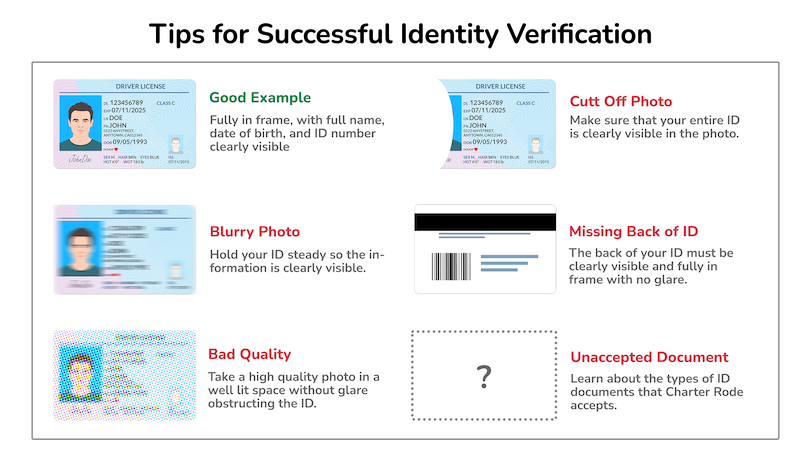
- Use the latest version of Google Chrome browser (whether you’re on a computer or mobile device)
- Your phone’s camera typically produces the clearest photo
- Make sure your area is well-lit (natural light works best)
- Use indirect light for your ID to avoid glare
- If you must use a webcam, try setting the ID flat down and move the webcam instead of moving the ID
- Use a plain background for the ID
- Don’t hold the ID in your fingers (confuses the focusing lens)